
How to create custom module in magento 2
To create Hello World module, you need to complete the following high-level steps:
Step 1: Create the folder of Hello World module
app/code/A/HelloWorld
Step 2: Create etc/module.xml file
app/code/A/HelloWorld/etc/module.xml
<?xml version="1.0"?><config xmlns:xsi="http://www.w3.org/2001/XMLSchema-instance" xsi:noNamespaceSchemaLocation="urn:magento:framework:Module/etc/module.xsd"><module name="A_HelloWorld" setup_version="1.0.0"></module></config>
- Step 3: Create etc/registration.php file
<?php\Magento\Framework\Component\ComponentRegistrar::register(\Magento\Framework\Component\ComponentRegistrar::MODULE,'A_HelloWorld',__DIR__);
- Step 4: Enable the module
php bin/magento module:status
You should see the module is disable now:
Follow exact guide to enable the module right now, let run the command as:
php bin/magento module:enable A_HelloWorld
Your module should be available now.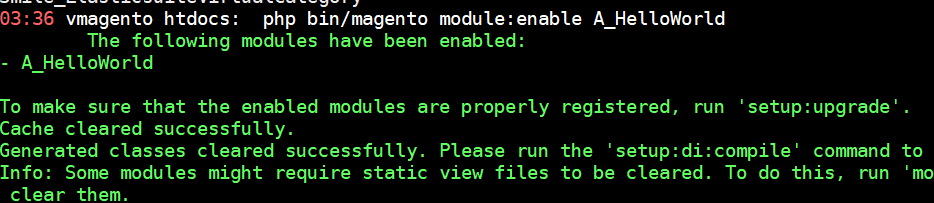
After this step, when you open your website in browser you will get an error saying
Please upgrade your database: Run “bin/magento setup:upgrade” from the Magento root directory.
Let run the command:
php bin/magento setup:upgrade
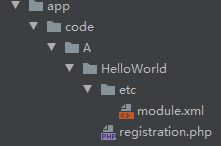
Finally the fold like this:
标签
热门文章
- 1 Magento ver. 2.2.0-dev - A technical prob... 16504
- 2 ECS git pull 代码很慢的问题 14638
- 3 玩客云监工客户端 13129
- 4 Magento 2 UI Form Validation 13048
- 5 Codeigniter SSL 强制重定向至https访问 12937
- 6 magento2 完整卸载模块的正确姿势 12574
- 7 Magento fix 500 12217
- 8 Magento index is locked by another reinde... 10669
- 9 Ubuntu删除日志文件 8946
- 10 Magento 2安装ElasticSearch 6.x搜索引擎-Ub... 8560
微信公众号